
Practical Guides
Free Cancellation Should Not Require a Law Degree
Tratok prints cancellation terms where you can see them, before you book, in language a human can read. Revolutionary, apparently.
Somewhere in the legacy booking world there is a paragraph, set in eight-point grey text on page five of checkout, that decides whether your 400 dollars comes back to you. You will find it after you book. Possibly after you cancel. Too often, the rules only become clear once breaking them has become expensive.
Tratok puts the rules on the front of the box, where rules belong.
Look at any listing on Tratok and the cancellation badge sits right at the top, beside instant confirmation, before a single photo has finished loading. Free cancellation means free cancellation. And behind the badge sits something the industry has never offered this clearly: a tiered policy you can actually read, showing exactly what comes back to you and when, from the day you book to the day you arrive.
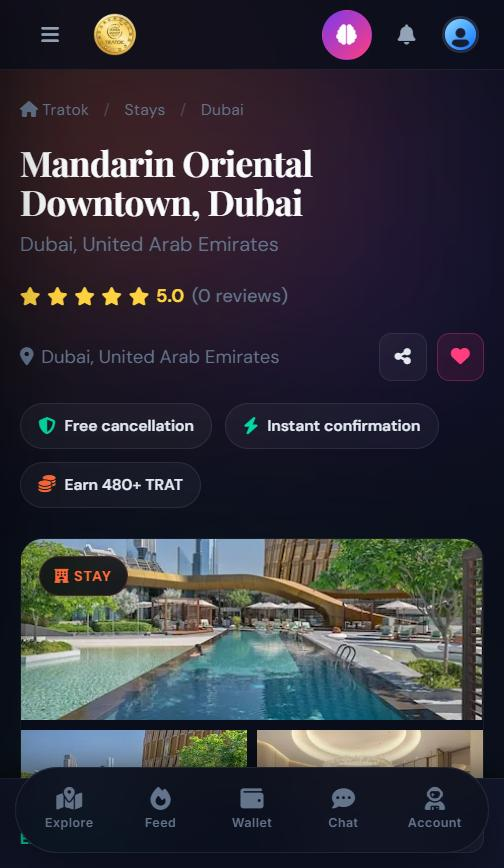
The badge, above the fold, before you have spent a single TRAT.
How a tiered policy reads on Tratok
Every property sets its policy as clear tiers, and Tratok shows them as a simple timeline rather than a paragraph of legal fog. A typical flexible policy looks like this:
And the policy follows you everywhere: on the listing, on your booking confirmation, on the ticket in My Trips, even in the confirmation email. If you do cancel, Tratok shows you the exact refund before you confirm the cancellation. No surprises at any point in the journey, which we gather is a novel experience.
Fine print vs front print
Transparency is not a feature. It is a decision. Tratok made it years ago.
Questions travellers ask
Where do I see a listing’s cancellation policy?
On the listing itself before you book, on your confirmation page, on your ticket in My Trips, and in your confirmation email. It follows the booking everywhere.
Do all properties have the same policy?
No, each property sets its own tiers. What is identical everywhere is the honesty: whatever the policy, you read it in full before spending anything.
How do I cancel if I need to?
From the booking in My Trips at tratok.net. Tratok shows the exact refund amount for your tier and asks you to confirm. Two taps, zero mystery.
Keep exploring Tratok
Never miss an update
Get new Tratok articles by email: the moment they publish, or as one weekly digest.